Download thumbnail directly while watching the video
Download thumbnail directly while watching the video
Have you ever been watching a YouTube video and thought, "I really love this thumbnail design, I wish I could save it right now"?
Usually, this involves pausing the video, copying the URL, opening a new tab, searching for a thumbnail downloader, pasting the link, and waiting for it to process. It completely breaks your workflow and viewing experience.
The NeuraBlink Shortcut Method
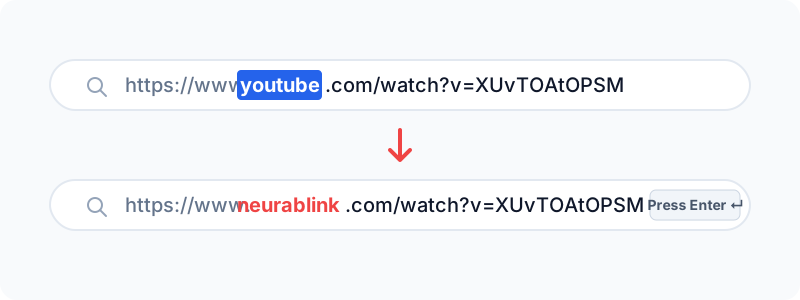
With NeuraBlink, you can download the thumbnail directly from the address bar while you are still on the video page. You don't need to copy any links or open new blank tabs.
Here is exactly how you do it:
- Click your Address Bar: While watching the video on YouTube, click your browser's address bar at the top of the screen.
- Highlight 'youtube': Double click or highlight the word
youtubein the URL (e.g.,https://www.youtube.com/watch?v=...) - Type 'neurablink': Replace the highlighted text by typing
neurablink, so the URL now looks likehttps://www.neurablink.com/watch?v=... - Hit Enter: Press Enter on your keyboard.
That's it! You will be instantly teleported to NeuraBlink, and the exact thumbnail of the video you were just watching will already be loaded on the screen in maximum 4K/1080p resolution. Simply click the download button and you are done.
No Extensions Required
The best part about this trick is that it requires absolutely zero browser extensions. It works natively in Chrome, Safari, Firefox, Edge, and even on your mobile phone's browser!