The Fastest Way to Download YouTube Thumbnails
If you are a content creator, designer, or researcher, you likely download dozens of YouTube thumbnails a week. The standard process is tedious: you find the video, copy the URL, open a new tab, navigate to a downloader site, paste the URL, hit enter, and finally download the image.
What if you could skip almost all of those steps?
With the new NeuraBlink URL shortcut feature, you can grab the highest-quality thumbnail of any video without ever copying and pasting.
How the URL Shortcut Works
We have engineered a seamless intercept mechanism that allows you to transition directly from watching a YouTube video to downloading its cover image in less than two seconds.
Here is exactly how to do it:
Step 1: Find your video
Simply navigate to YouTube as you normally would and click on the video whose thumbnail you want to save.
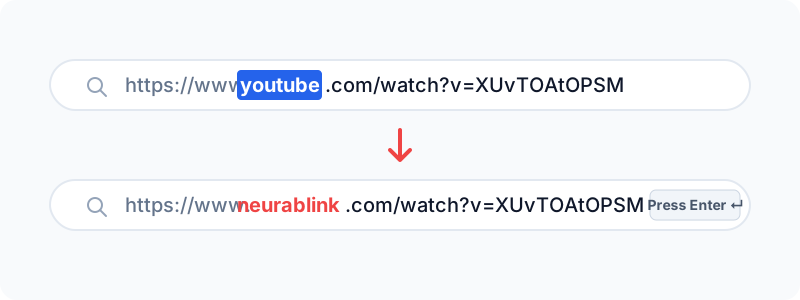
For example, your browser's address bar will look something like this:
https://www.youtube.com/watch?v=XUvTOAtOPSM
Step 2: Replace "youtube" with "neurablink"
Click into your browser's address bar. Delete the word youtube and type neurablink in its place.
Your address bar should now look like this:
https://www.neurablink.com/watch?v=XUvTOAtOPSM
(Note: This trick also works perfectly for YouTube Shorts! Just change youtube.com/shorts/... to neurablink.com/shorts/...)
Step 3: Hit Enter
Once you press Enter, you will be instantly transported to the NeuraBlink platform. Because the video ID is still attached to the URL, our system automatically detects it, pre-fills the search bar, and instantly fetches the high-definition thumbnails.
Within a split second, you'll be staring at the 4K and 1080p versions of the cover image, ready for a one-click download.
Why This is a Game Changer
This feature fundamentally changes workflow efficiency. By utilizing the address bar shortcut:
- You save time: No more opening new tabs or fumbling with copy/paste shortcuts.
- You stay focused: It keeps you in the flow state while doing research or compiling mood boards.
- It feels like native integration: It transforms NeuraBlink from just another website into an integrated browser tool, without requiring you to install heavy extensions or plugins.
Try it out on the very next video you watch. Replace youtube with neurablink, hit enter, and experience the speed for yourself!